Visual Information
Presents system status, perception imagery and project-defined prompts on a 10.1-inch high-brightness touchscreen.
 Contact Us ↗
Designed for driver interaction with EV-IPS, it presents operating status, environmental perception and project-defined risk prompts in one place, supporting operation and information reception through a touchscreen, physical buttons and stereo speakers.
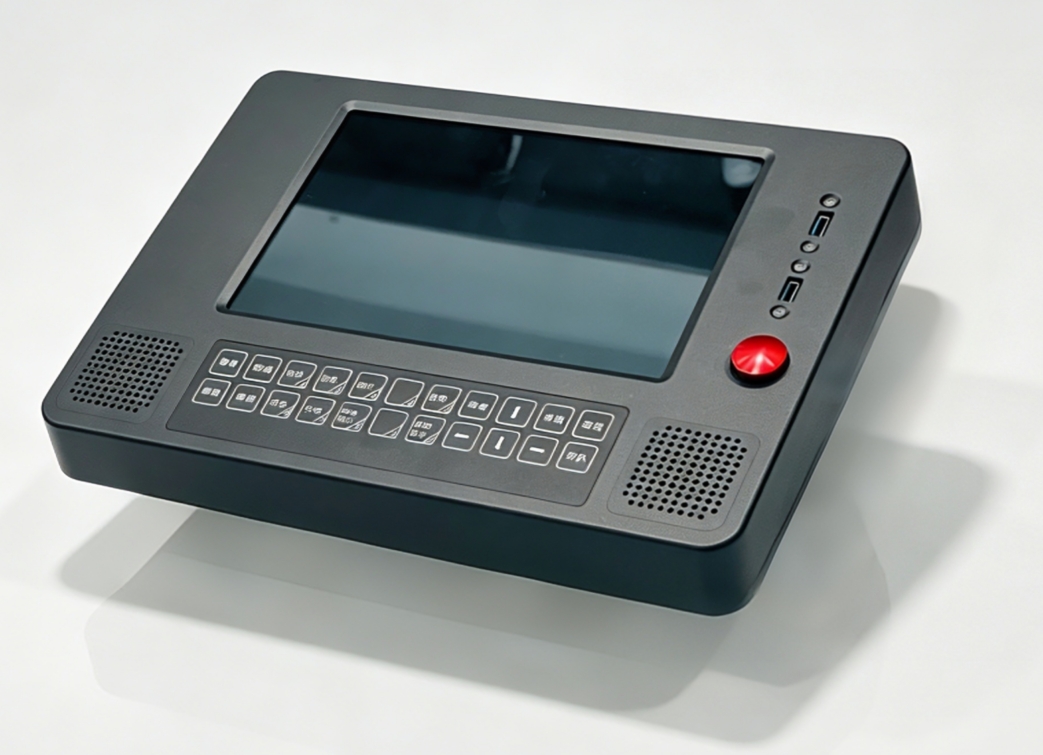
IPS-HMI combines display, touch, buttons and audio output in an onboard interaction terminal connected to EV-IPS over Gigabit Ethernet. Its 10.1-inch high-brightness screen presents status and prompts, while the physical keypad and dedicated buttons provide additional cab controls.
Presents system status, perception imagery and project-defined prompts on a 10.1-inch high-brightness touchscreen.
A 2 × 11 matrix keypad with latching and reset buttons provides independent cab input channels.
Dual 5 W stereo speakers support system audio and project-defined alerts.
Connects to EV-IPS over Gigabit Ethernet, with power and mechanical installation adapted to the cab.
The HMI handles information presentation and human interaction; it does not independently perform environmental perception or risk assessment. Interface content, prompt logic and available operations are defined by project software.
Outputs system status, perception results and project-defined prompts.
Unifies graphics, touch, button and audio interaction.
Allows the driver to view status, receive prompts and perform authorized operations.
The touchscreen supports graphical information browsing; the matrix keypad handles common functions; latching and reset buttons provide independent controls; and dual speakers deliver audio prompts. Channel functions are subject to the project interface and operating instructions.
Display parameters are from the V1.0 datasheet. Interface content, colors, type sizes, alert levels and touch scope are defined by the software version and project requirements.
The terminal connects to EV-IPS through M12 A-Code Gigabit Ethernet, provides two USB commissioning ports, and accepts a DC 12–24 V input.
DC 12–24 V input; maximum power 20 W.
One M12 A-Code female network port for system data communication.
For project deployment, commissioning and maintenance; permissions are defined by the delivery plan.
The device measures 330 × 230 × 57 mm and weighs 3.2 kg. Rear mounting uses a 75 × 75 mm hole pattern with four M4 bolts. Installation must also verify viewing angle, touch clearance, speaker obstruction and cable outlet.
Rear Mounting Pattern 75 × 75 mm · 4 × M4
The following parameters are based on the current V1.0 datasheet for preliminary design and installation coordination. Formal configuration, interface definitions and acceptance criteria are subject to project technical documents.
The datasheet provides operating temperature/humidity and protection rating and states suitability for locomotive vibration and electromagnetic interference. Specific test standards and levels must be confirmed in project documents.
Confirm displayed information, operating permissions, button definitions, audio strategy and driver workflow.
Confirm viewing angle, reach, mounting holes, speaker clearance, power and network harnesses.
Deploy HMI software and complete network and business commissioning with the EV-IPS onboard computer.
Validate display, touch, buttons, audio, performance and environmental adaptability against project requirements.
Provide cab layout, installation space, power interface and interaction requirements, and we will help confirm the HMI configuration and integration plan.
Last updated